Showing posts with label autocad error. Show all posts

Thursday, 21 November 2024

Fix Lỗi Autocad install Error 103 - Lỗi 103 Khi Cài Autocad

Fix Lỗi Autocad install Error 103 - Lỗi 103 Khi Cài Autocad

Fix Lỗi Autocad install Error 103 - Lỗi 103 Khi Cài Autocad


Solution:

To solve the issue and install the software, do the following:

  1. Remove the ODIS Component:
    1. Go to C:\Program Files\Autodesk\AdODIS\V1.
    2. Right-click RemoveODIS.exe and select "Run as Administrator".
  2. Remove the Autodesk Access Component (If installed):
    1. Go to C:\Program Files\Autodesk\AdODIS\V1\Access.
    2. Right-click RemoveAccess.exe and select "Run as Administrator".
  3. Reboot the System.
  4. Install the latest version of the ODIS Component:
    1. Download the latest version of ODIS from this link.
    2. Run AdODIS-installer.exe.
  5. If needed, Install the latest version of the Autodesk Access Component:
    1. Download the latest version of Autodesk Access from this link.
    2. Run AdAccess-installer.exe.
  6. Install the software. 
Fix Lỗi Trình Cài Đặt Autocad Tự Biến Mất - autocad installer auto out

Fix Lỗi Trình Cài Đặt Autocad Tự Biến Mất - autocad installer auto out

Fix Lỗi Trình Cài Đặt Autocad Tự Biến Mất - autocad installer auto out


Cách mới: Chạy lại Odis thôi không cần xóa gì. Odis có sẵn trong bộ cài. Rồi sau đó tiếp tục chạy file uninstal license (Autodesk License Patcher Uninstaller) trong thư mục crack. chạy xong thì sẽ cài bình thường.
---------- Cách này cũ rồi ----------------------------


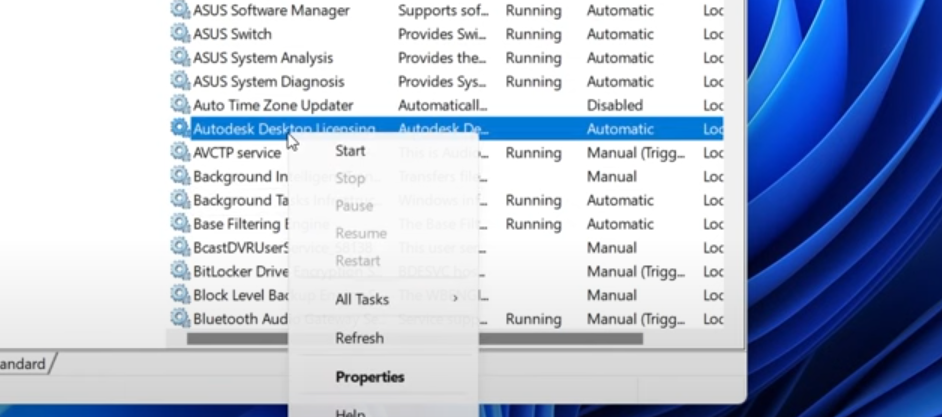
Chạy cái remove ODis kia, và vào services stop cái Autodesk Desktop License như ảnh dưới. xong là cài bình thường ngay


Tiếp theo tải App này https://www.wisecleaner.com/wise-care-365.html
cài đặt ra và chạy nó 


cho chạy checkup


Chạy xong nhấn Fix và khởi động lại máy là ok. 

Nguồn https://www.youtube.com/watch?v=hdP8hQUfGJA